
Linux下安装mysql8.0
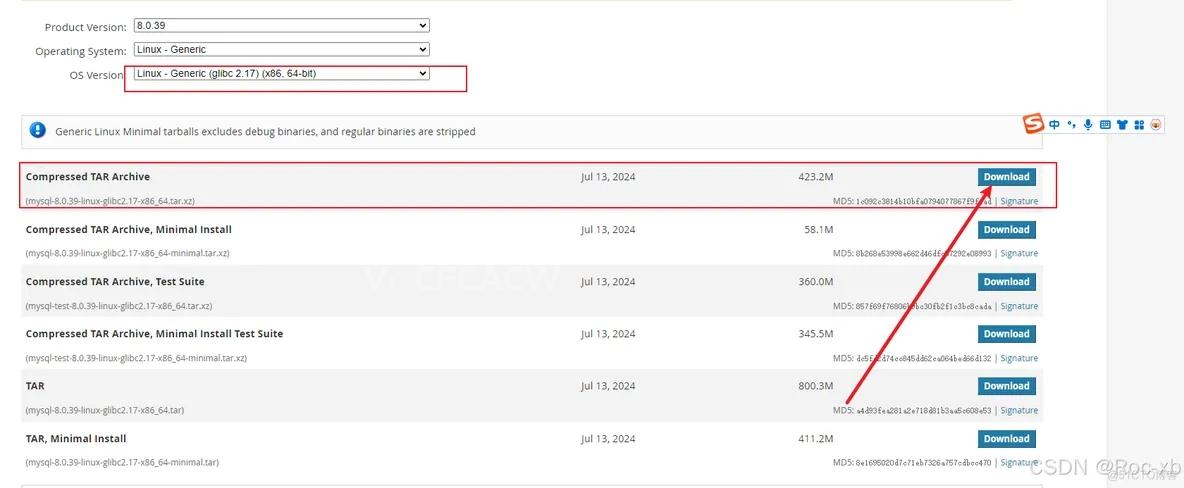
一、下载mysql8.0安装包
1、在local创建mysql文件夹
cd /usr/local

mkdir mysql

cd mysql
2、使用wget下载mysql8.0的xz安装包
wget https://dev.mysql.com/get/Downloads/MySQL-8.0/mysql-8.0.20-linux-glibc2.12-x86_64.tar.xz
二、解压mysql8.0安装包
1、解压
tar -xvJf mysql-8.0.21-linux-glibc2.12-x86_64.tar.xz
2、重命名解压后的mysql文件夹(名字太长了)
mv mysql-8.0.21-linux-glibc2.12-x86_64 mysql8.0
3、创建data存储文件
cd mysql8.0

mkdir data
三、创建用户和用户组,并赋予权限
1、创建用户和用户组
groupadd mysql

useradd -g mysql mysql
2、给用户赋予权限
chown -R mysql.mysql /usr/local/mysql/mysql8.0
四、初始化mysql信息
1、切换到mysql8.0安装路径下
Tip:绝对路径:cd /usr/local/mysql/mysql8.0/bin
cd bin
2、初始化mysql基本信息
./mysqld --user=mysql --basedir=/usr/local/mysql/mysql8.0 --datadir=/usr/local/mysql/mysql8.0/data/ --initialize
3、获取到临时mysql密码

五、添加mysqld服务到系统
1、将mysqld服务添加到系统中
cd /usr/local/mysql/mysql8.0

cp -a ./support-files/mysql.server /etc/init.d/mysql
2、授权以及添加服务
chmod +x /etc/init.d/mysql

chkconfig --add mysql
3、mysql5.7以后就没有my.cnf了,所以我们创建一个。(个人觉得方便一些)
sudo vim my.cnf
# Example MySQL config file for small systems.  #  # This is for a system with little memory (<= 64M) where MySQL is only used  # from time to time and it's important that the mysqld daemon  # doesn't use much resources.  #  # MySQL programs look for option files in a set of  # locations which depend on the deployment platform.  # You can copy this option file to one of those  # locations. For information about these locations, see:  # http://dev.mysql.com/doc/mysql/en/option-files.html  #  # In this file, you can use all long options that a program supports.  # If you want to know which options a program supports, run the program  # with the "--help" option.
 # The following options will be passed to all MySQL clients  [client]  default-character-set=utf8
#password   = k0Ui&wV(Z3ytport        = 3306 socket      = /tmp/mysql.sock

# Here follows entries for some specific programs
 # The MySQL server   [mysqld]
 #配置mysql的文件夹 和 mysql data目录basedir=/usr/local/mysql/mysql8.0datadir=/usr/local/mysql/mysql8.0/data
default-storage-engine=INNODB  character-set-server=utf8
collation-server=utf8_general_ci
port        = 3306 socket      = /tmp/mysql.sock
skip-external-locking
key_buffer_size = 16K
max_allowed_packet = 1M
table_open_cache = 4 sort_buffer_size = 64K
read_buffer_size = 256K
read_rnd_buffer_size = 256K
net_buffer_length = 2K
thread_stack = 128K

# Don't listen on a TCP/IP port at all. This can be a security enhancement,  # if all processes that need to connect to mysqld run on the same host.  # All interaction with mysqld must be made via Unix sockets or named pipes.  # Note that using this option without enabling named pipes on Windows  # (using the "enable-named-pipe" option) will render mysqld useless!  #   #skip-networking  server-id   = 1
 # Uncomment the following if you want to log updates  #log-bin=mysql-bin
 # binary logging format - mixed recommended  #binlog_format=mixed
 # Causes updates to non-transactional engines using statement format to be  # written directly to binary log. Before using this option make sure that  # there are no dependencies between transactional and non-transactional  # tables such as in the statement INSERT INTO t_myisam SELECT * FROM  # t_innodb; otherwise, slaves may diverge from the master.  #binlog_direct_non_transactional_updates=TRUE
 # Uncomment the following if you are using InnoDB tables  #innodb_data_home_dir = /usr/local/mysql/data  #innodb_data_file_path = ibdata1:10M:autoextend  #innodb_log_group_home_dir = /usr/local/mysql/data  # You can set .._buffer_pool_size up to 50 - 80 %  # of RAM but beware of setting memory usage too high  #innodb_buffer_pool_size = 16M  #innodb_additional_mem_pool_size = 2M  # Set .._log_file_size to 25 % of buffer pool size  #innodb_log_file_size = 5M  #innodb_log_buffer_size = 8M  #innodb_flush_log_at_trx_commit = 1 #innodb_lock_wait_timeout = 50
 [mysqldump]  quick
max_allowed_packet = 16M

[mysql]  no-auto-rehash
# Remove the next comment character if you are not familiar with SQL  #safe-updates
 [myisamchk]  key_buffer_size = 8M
sort_buffer_size = 8M

[mysqlhotcopy]  interactive-timeout
*设置my.cnf权限
sudo chmod 664 /etc/my.cnf
4、启动mysql服务
service mysql start
如果出现下面报错
解决
将/var/lock/subsys/下mysql文件删除
5、查看mysql服务状态
service mysql status
6、将mysql命令添加到服务
ln -s /usr/local/mysql/mysql8.0/bin/mysql /usr/bin
六、登录mysql
1、登录 密码使用之前随机生成的密码
mysql mysql -uroot -p
2、修改管理员密码 其中123456是新的密码自己设置
ALTER USER 'root'@'localhost' IDENTIFIED WITH mysql_native_password BY '123456';
3、重新加载缓存,使密码生效
flush privileges;
4、退出mysql,用新密码尝试登录管理员
七、修改mysql配置,使其可以用工具远程登录
update user set host='%' where user='root';
flush privileges;
云服务器不能远程连接mysql,解决
如果是买的云服务器,例如:阿里云服务器的,请到设置mysql(3306)安全策略